There's no barrel plug on this laptop. Everything goes through USB-C, which is convenient right up until a cable gets flaky and the battery icon stops filling. The good news is that USB-C problems are usually cheap to fix if you go step by step.
What the XPS 16 expects
- Charger: Tom's Hardware lists a 100W USB-C adapter in the box, and HotHardware describes it as a 100W GaN unit.
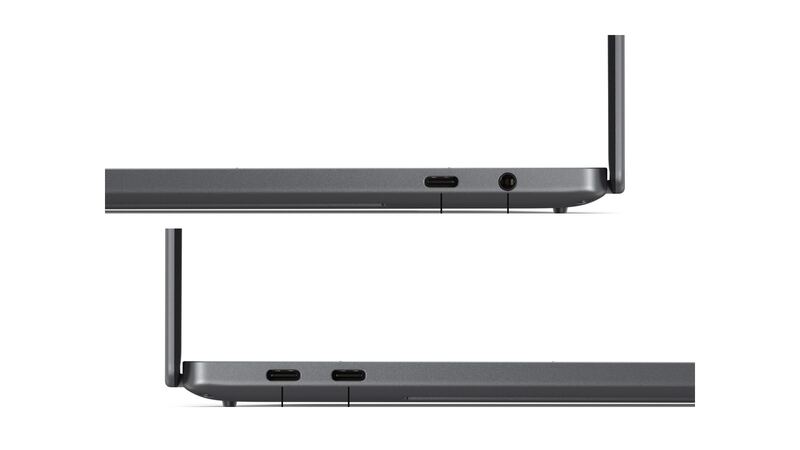
- Ports: three Thunderbolt 4 ports plus a 3.5mm audio jack. Dell's port diagrams show one USB-C and the audio jack on one side and two USB-C ports on the other. There's no USB-A, HDMI or Ethernet.
- Battery: 70Wh, 3-cell, per Dell's store page.
HotHardware noted the laptop couldn't drain its battery while plugged into the 100W charger. So if yours drains while plugged in during normal use, something isn't delivering full power.
Fixes to try, in order
- Try every port. All three USB-C ports are Thunderbolt 4. If one works and another doesn't, you've found a port problem, not a battery problem.
- Swap the cable. USB-C cables fail more than chargers do. Use a cable rated for 100W (5A). A phone cable may only carry 60W or less.
- Check the wattage. A 45W or 65W charger may charge very slowly or not keep up under load. Use the 100W adapter or another USB-C PD charger rated for 100W.
- Inspect the port. Shine a light in. Lint packed in a USB-C port stops the plug from seating. Clear it gently with a wooden toothpick, never metal, with the laptop off.
- Check charge settings. Dell power settings and the BIOS can limit charging to protect the battery. If it stops at a set percentage and says "plugged in, not charging," that may be a setting, not a fault.
- Update BIOS and drivers through Dell SupportAssist.
- Run Dell's built-in diagnostics before calling. Dell support will ask anyway.
What it costs
| Problem | Fix | Cost |
|---|---|---|
| Dead or weak charger | Dell GaN Ultra Slim 100W USB-C (492-BDNJ) | $89.69 at Staples |
| Dead or weak charger | Third-party 100W USB-C Dell-compatible charger | $52.39 on Newegg (check the listing's compatibility) |
| Bad cable | 100W-rated USB-C cable | Varies, usually cheaper than a charger |
| Port or board fault, in warranty | Dell warranty service | $0 |
| Port or board fault, out of warranty | Dell mail-in diagnostic plus quote | Nonrefundable diagnostic fee, then a quoted repair |
| Independent shop | Diagnosis, then quote | uBreakiFix lists charging port repair with a free diagnostic |
Dell's out-of-warranty article says you book Hardware Diagnostics online, Dell sends a box and prepaid label, a technician diagnoses it, and you get the repair cost by email and text. If you decline, it comes back unrepaired with no added repair charge. Liquid damage and electrical issues are among the eligible problems.
When it's the battery or the board
If it charges fine when it's off but not when it's on, or the battery percentage jumps around, the battery may be worn. If none of the three ports charge with a known-good 100W charger and cable, the fault is likely on the board, and that's a Dell or shop repair. HotHardware found this version harder to open than the old one, with more clips and fewer screws, so we don't recommend DIY board or port work.
Worth fixing?
Usually yes, and often for the price of a charger or cable. Even a board-level repair on a laptop this new is worth a quote. If it's older and has other issues, our repair-or-replace calculator helps you decide. More help is on the Dell XPS 16 (2026) repair page, and cracked screens are covered in our XPS 16 screen guide.
Prices checked October 15, 2026.