The UX3405 is known for long battery life, so when it starts fading, people notice. ASUS rates it for 15+ hours of 1080p video playback with Wi-Fi off, and says it can charge to 60% in 49 minutes. If yours is nowhere close to that on light work, start with a quick health check.
Check the battery's health first
- Windows battery report: open a command prompt and run powercfg /batteryreport. Compare Design Capacity to Full Charge Capacity. A big gap means real wear.
- MyASUS: the app shows battery status and includes ASUS's battery care charging modes, which cap the charge level to slow wear.
- Find the drain: Settings, then System, then Power and battery shows which apps used the most power.
- Charger check: if it won't charge at all, try another USB-C charger and port before blaming the battery.
- Updates: install BIOS and driver updates from MyASUS. Charging bugs sometimes get fixed in firmware.
What it costs
| Route | What you pay | Notes |
|---|---|---|
| ASUS warranty, defect | $0 | Check your warranty status in MyASUS |
| ASUS Battery Service Package | Plan price (not listed) | One battery replacement per year for a manufacturer defect after the standard battery warranty ends |
| ASUS out of warranty | Quote | No published flat price |
| Third-party part, C41N2306 75Wh (15.56V) | $113.99 on Newegg | Seller lists Zenbook 14 OLED UX3405 as compatible |
| Third-party part, C22N2211 75Wh (7.74V) | $234.64 on Newegg | Seller lists UX3405MA, UX3405ZA and UX3405VA |
| Independent shop | Price after diagnosis | uBreakiFix lists ASUS battery replacement with a free diagnostic |
Two big caveats on ASUS coverage. ASUS's regular Warranty Extension plans don't cover batteries at all. And the Battery Service Package only covers manufacturer defects on the original battery, not normal capacity loss from age. So "it just doesn't last as long anymore" usually isn't a covered claim.
Pick the right battery
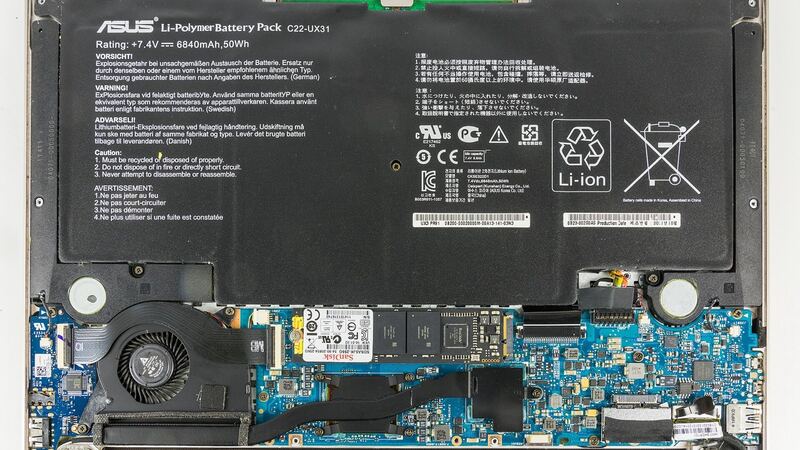
Here's why the two listings above don't agree: one is a 4-cell pack at about 15.5V and the other is a 2-cell pack at about 7.7V. They aren't interchangeable, even though both say 75Wh. Different UX3405 sub-models may use different packs. Before you order:
- Open the bottom cover and read the model number printed on your battery, or have a shop do it.
- Match the part number exactly, including the connector shape and cable position.
- Buy from a seller with a real return window. Both Newegg listings showed 30-day returns.
- Be wary of very cheap packs with no brand. Bad cells are the main risk with aftermarket batteries.
DIY difficulty
Moderate. You'll remove the bottom panel screws (some laptops hide a few under the rubber feet), pop the clips with a plastic pick, and disconnect the battery before anything else. The pack is held with screws and sometimes adhesive. If you've never opened a laptop, a shop is a good call, especially since a slipped tool can damage the cells.
Questions for the shop
- Which battery part number are you installing, and is it ASUS or third-party?
- What's the warranty on the battery itself?
- Did you test the charger and port too?
- Will you recycle the old battery?
Worth fixing?
Yes. A new battery is cheap compared with a new laptop, and the UX3405 is still a capable machine. If the screen or keyboard is also acting up, total it up in our repair-or-replace calculator. More fixes are on the ASUS Zenbook 14 OLED repair page, and screen trouble is covered in our Zenbook 14 OLED screen guide.
Prices checked October 15, 2026.