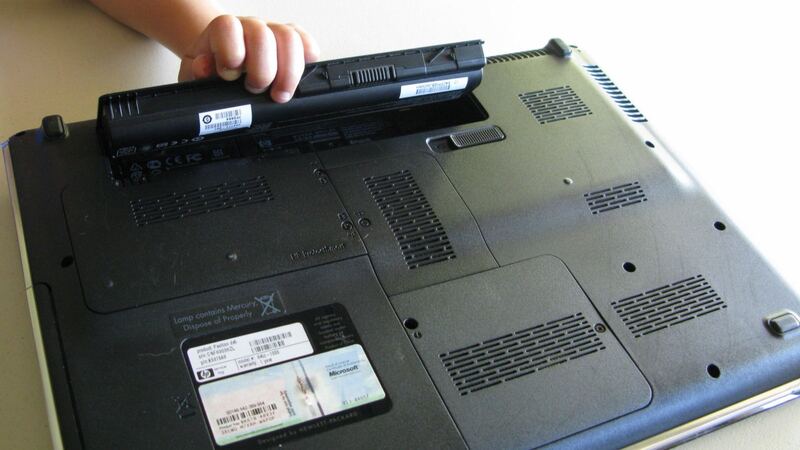
Laptop batteries are wear items. Every charge cycle chips away a little capacity, and after a couple of years a laptop that used to last all day starts begging for a charger by lunch. That's normal. What matters on the X1 Carbon Gen 14 is that the battery isn't glued into a sealed shell, so replacing it doesn't have to mean shipping the whole laptop away for a week.
The battery basics
From Lenovo's PSREF spec sheet for the Gen 14 Aura Edition:
- Capacity: 58Wh lithium-ion
- Rapid Charge: up to 80% in 1 hour with the 65W adapter, but Lenovo only promises that with the laptop off, in standby or hibernating
- Rated life: up to 19.2 hours on MobileMark 30 in the best configuration, less on others
- Charging: 65W USB-C adapter, and all three Thunderbolt 4 ports accept USB PD from 15W to 65W
- Warranty: 1-year or 3-year options, and the 3-year options are listed as "1-year battery"
PCWorld, after opening one at CES 2026, reported that removing the backplate gives you immediate access, and that the battery, SSD and USB ports can all be easily swapped. Lenovo's product page lists a replaceable battery and customer replaceable units (CRUs) among the features.
What a battery replacement costs
| Route | What you pay | Notes |
|---|---|---|
| Lenovo, first year, defect | $0 | Battery coverage is 1 year even on 3-year plans |
| Lenovo, after year one | Quote | Lenovo doesn't publish a flat Gen 14 battery price |
| Independent shop | Price after diagnosis | uBreakiFix offers a free diagnostic and a 1-year repair warranty |
| DIY | Cost of the genuine part, once listed | Use the part number from Lenovo's parts lookup for your serial |
Since Gen 14 is a 2026 model, aftermarket batteries for it are still scarce, and plenty of listings for older X1 Carbons use different packs. Don't buy anything that just says "X1 Carbon." Look up your serial number on Lenovo's support site, find the battery part number for your exact machine type, and match that. A wrong pack can have a different connector or shape even if the capacity looks right.
Is it really the battery?
Check the numbers before you spend money:
- In Windows, open a command prompt and run powercfg /batteryreport. The report compares Design Capacity with Full Charge Capacity. If full charge is way below design, the battery has worn down.
- Lenovo Vantage (or Lenovo Commercial Vantage on business units) shows battery health and lets you set charge thresholds.
- Short battery life can also be a runaway app. Check Task Manager for something burning CPU in the background.
- If it won't charge at all, try another port and another USB-C charger rated 65W before blaming the battery.
Swelling is an emergency, not an annoyance
If the bottom cover bulges, the touchpad clicks stiffly or not at all, or the laptop rocks on a flat table, the battery may be swelling. Stop using it, unplug it, and don't press on the bulge or try to pry anything open. A swollen lithium battery can catch fire if punctured. Get it to Lenovo or a shop that handles swollen packs. This is one case where you shouldn't DIY.
DIY or pro?
If you're out of the battery warranty, the laptop isn't swollen, and you can get the right genuine part, this is a fair DIY job. Power the laptop fully off first (not sleep), remove the bottom screws, lift the backplate, and disconnect the battery before you touch anything else. Then reverse it. If you're still in the first year, don't bother: send it to Lenovo for free. If you manage a fleet of these for work, see if your company's service contract already covers batteries.
What to ask before paying
- Is it a genuine Lenovo battery with the part number for my machine type?
- Is the old battery being recycled properly?
- Does the repair come with its own warranty, and for how long?
- Did you check the charging port and adapter too, in case the battery wasn't the real problem?
Worth fixing?
Yes. A battery is the part every laptop wears out first, and on this model it's built to be replaced. Putting a new pack in a machine that cost thousands is the obvious move. If several things are failing at once, plug them into our repair-or-replace calculator. More fixes live on the ThinkPad X1 Carbon Gen 14 repair page, and keyboard trouble is covered in our X1 Carbon Gen 14 keyboard guide.
Prices checked October 15, 2026.