The 2021 MacBook Pro 16 has a 100-watt-hour battery (Apple's footnote lists 99.6 Wh). When new, Apple rated it for up to 21 hours of movie playback and up to 14 hours of wireless web browsing. That's a huge tank, so when yours starts dying by lunch, you notice.
What it costs
| Option | Price |
|---|---|
| Apple battery service | $249 |
| With AppleCare+ | $0 below 80% capacity |
| Defective battery in year one | Covered by Apple's one-year warranty |
| Independent shop | Varies, ask for a written quote |
How to check your battery
- System Settings > Battery, then the info button next to Battery Health, shows Normal or Service Recommended and your Maximum Capacity.
- Hold Option, click the Apple menu, choose System Information > Power. Look for Cycle Count.
Apple's maximum cycle count for this model is 1,000, and Apple says a battery is "considered consumed" at that point. Its notebook batteries are designed to keep up to 80% of their original capacity at 1,000 complete cycles.
Pro users burn through cycles faster
A cycle is 100% of the battery's capacity used, not one charge. Run the battery from 100% down to 50% twice and you've used one cycle. People who buy a 16-inch Pro tend to push it: exporting video, compiling code, running virtual machines, all on battery. That chews through cycles much faster than browsing and email. A five-year-old 16-inch used for heavy work can easily be near 1,000.
Try these before paying $249
- Check Activity Monitor > Energy. A stuck process or runaway browser tab can tank a good battery.
- Watch the brightness. At high brightness this display draws serious power. Dropping it a notch or two adds real time.
- Unplug accessories you aren't using. Bus-powered drives and hubs pull from the battery.
- Keep it cool. Apple says MacBooks work best at 50° to 95° F (10° to 35° C). Heat is the fastest way to age a lithium battery.
If you've done all that and it still drains fast, especially with high cycles or under 80% capacity, the battery is just worn out.
What the repair involves
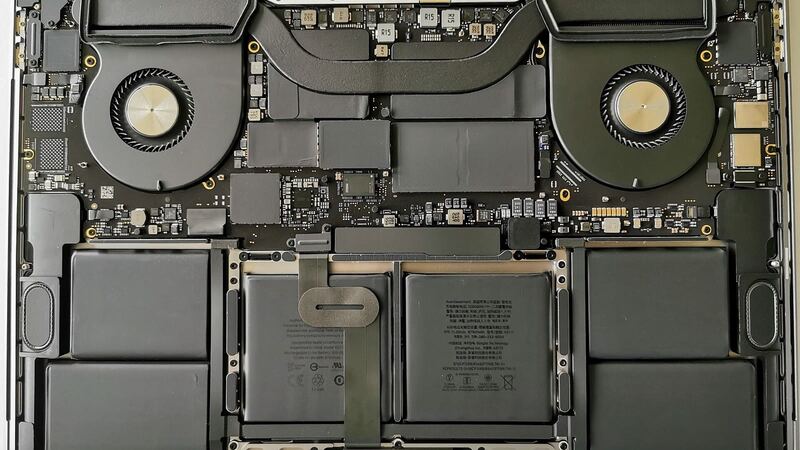
In Apple's repair manual for the 16-inch (2021), the battery lives in the procedure called Top Case with Battery and Keyboard. The battery cells sit in the top case, under the keyboard. It's a careful, multi-step job, and it's one more reason to let Apple or an experienced shop do it rather than trying it on the kitchen table.
Apple or a local shop?
Apple's $249 gets a genuine battery and Apple's warranty on the work. Shops can be cheaper. Ask if the battery is new, who made it, and how long it's warrantied. When you get the laptop back, check System Information > Power. A new battery should show a cycle count at or near zero.
Is it worth it?
Usually, yes. The M1 Pro and M1 Max are still fast for real work, and a new battery brings back the all-day runtime this laptop was known for. If the screen is also damaged, though, add that quote on top before you decide. Our repair or replace calculator can help you compare.
Screen damaged too? Read our 2021 MacBook Pro 16 screen guide. All prices are on the MacBook Pro 16-inch (2021) page. Apple prices checked October 14, 2026.